MEPCO Old Bill Check – View Previous Bill History Online
Want to see what you were billed in earlier months, or confirm that a past payment was recorded? A MEPCO old bill check is simple, because every MEPCO bill carries a bill history table. This guide shows how to view your previous bill history online and how to get a copy of an older bill.
In this guide:
- What is MEPCO bill history?
- MEPCO old bill check online: step by step
- Can you download the bill of an old month?
- How to read your bill history
- Why checking your bill history is useful
- Frequently asked questions
What Is MEPCO Bill History?
Each MEPCO bill includes a small history table for the previous 12 months. This table is the quickest way to do a MEPCO old bill check, because it is already printed on your current bill and on the online copy. For every month it lists:
- Month: the billing month
- Units: the units billed in that month
- Bill: the amount billed
- Payment: the payment received
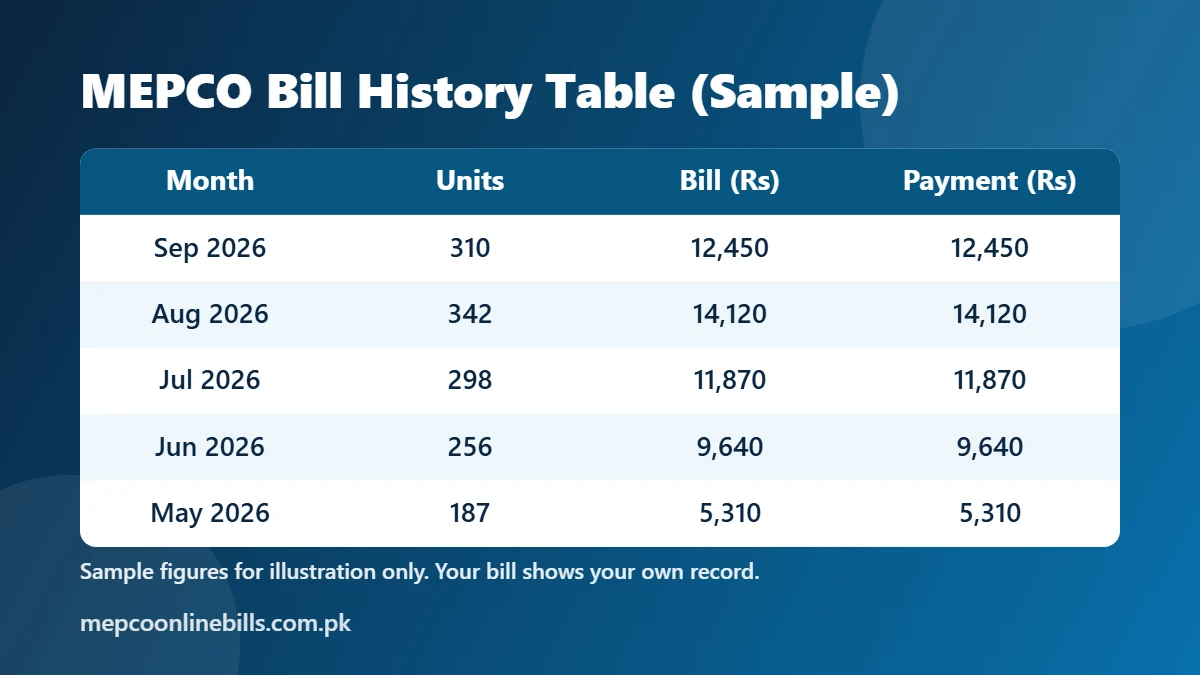
The picture above is only a sample to show the layout. Your own bill shows the real figures for your connection.
MEPCO Old Bill Check Online: Step by Step
- Open our MEPCO bill check tool.
- Enter your 14-digit reference number or your Customer ID.
- Press Check Bill. Your latest bill opens from the official PITC billing system in a new tab.
- Find the table with the columns Month, Units, Bill and Payment. It shows your MEPCO bill history for the previous months.
You can also open the bill on the official MEPCO Web Bill page with the same number. If you do not know your reference number, read how to check a MEPCO bill by CNIC to recover it first.
Can You Download the Bill of an Old Month?
The official MEPCO Web Bill page shows your latest bill only. It asks for a reference number or Customer ID and has no option to choose an earlier month, so the full bill of an old month cannot be opened online. A MEPCO old bill check online therefore means reading the history table on your latest bill.
If you need a complete copy of an older bill, for example for an office record:
- Ask the MEPCO customer service centre or subdivision office of your area. Take your reference number and CNIC with you.
- Check your own records, such as paper bills, saved PDF copies and payment receipts from your bank or mobile wallet app.
How to Read Your MEPCO Bill History
- Compare the Bill and Payment columns month by month. If a payment is missing or lower than the bill for that month, check whether arrears have been added to your current bill.
- Compare the units with the same month of last year. A big jump without a change in your usage is worth checking against your meter.
- Note any month billed on a defective meter. MEPCO says that when a meter is defective, the bill is estimated from your consumption in the same month of the previous year, so the history table shows what that estimate is based on.
Why Checking Your Bill History Is Useful
- Confirm payments. Make sure last month’s payment appears in the history. If arrears were added even though you paid, MEPCO advises showing your payment receipt at the customer service office so the record can be corrected.
- Compare units. See how your consumption changes between summer and winter months.
- Catch reading errors. MEPCO encourages consumers to check their own meter readings. If the reading on the bill does not match the meter, contact your subdivision office.
- Plan your budget. Use your past units with our MEPCO bill calculator to estimate the next bill.
Keep Your Own Record of Old Bills
Because only the latest bill is available online, save a copy every month. Open the bill, choose Print in your browser and select “Save as PDF”. Our MEPCO duplicate bill guide explains the steps. Twelve saved files give you a complete record for the year, and next year’s MEPCO old bill check becomes a matter of opening a file.
MEPCO also has an official mobile app, MEPCO SMART, which lets consumers check their electricity bills on a phone.
Frequently Asked Questions
How can I do a MEPCO old bill check online?
Open your latest bill with your reference number or Customer ID. The bill history table on it shows the units, bill amount and payment for the previous 12 months.
How many months does the MEPCO bill history show?
The history table on the bill covers the previous 12 months.
Can I get a MEPCO bill from last year?
Not online. The official page opens the latest bill only. For a copy of an older bill, ask your MEPCO customer service centre or subdivision office.
My payment is not showing in the bill history. What should I do?
Wait for the next bill first, because a payment made after the bill was prepared will appear on the following one. If it is still missing, take your payment receipt to your subdivision office or register a complaint. Our MEPCO complaint number guide explains how.
Is this the official MEPCO website?
No. This is an independent informational website. Bills opened through our tool come from the official PITC billing system.