MEPCO Bill Check Online 2026
Check your latest MEPCO electricity bill using your 14-digit Reference Number. Access your duplicate bill online and print or save a copy for your records.
Check Your MEPCO Bill
Enter your bill information below
What Is MEPCO Bill Online?
MEPCO, formally known as the Multan Electric Power Company, is the electricity distribution company that serves 13 districts of South Punjab through nine operation circles: Multan, Khanewal, Sahiwal, Bahawalpur, Bahawalnagar, Muzaffargarh, Dera Ghazi Khan, Rahim Yar Khan and Vehari. It supplies electricity to domestic, commercial and industrial consumers. MEPCO bills may include charges based on electricity consumption, applicable tariffs, taxes, and other approved fees; the specific costs depend on factors such as usage, connection type, applicable rates, and other billing parameters.
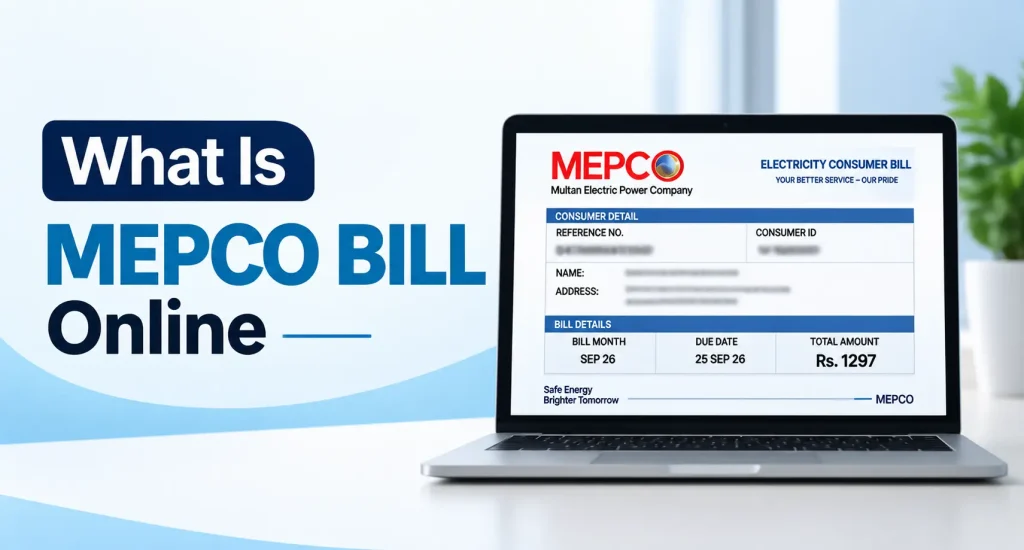
A standard MEPCO bill contains key details, including the billing month, the bill issuance date, the due date, units consumed, the payable amount, applicable charges, and a breakdown of electricity usage.
Consumers also call it the MEPCO web bill, MEPCO consumer bill or WAPDA bill. All of these names refer to the same monthly electricity bill, which you can check here with your reference number.
Check MEPCO Bill Online Full Guide
You can check your MEPCO bill for October 2026 on this page. Enter your 14-digit reference number in the tool above to view your latest bill once it has been issued.
You can check your bill for the current month online by following a few simple steps; the process is very easy. To view your bill details online, simply enter your 14-digit reference number or your 10-digit customer ID (also known as a consumer ID). Based on the data in the billing system, you can view details such as the bill amount, billing month, due date, late payment surcharge, units consumed, outstanding arrears, taxes, and other applicable charges.
Once you have checked your bill, you can make the payment using your preferred method; bank apps, online banking, mobile wallets, ATMs, and bank branches are excellent options. Always verify payment methods and instructions with MEPCO or the information provided by your bank.
If you have any complaints regarding billing or meter issues, or if you require information about power outages or new connections, please contact MEPCO’s official customer support channels or visit the relevant MEPCO office. Our MEPCO complaint number guide lists the helpline numbers and the online complaint method.
Some Additional Features
Here are some features of the online MEPCO bill-checking service:
- It is free – with no hidden charges
- It is fast – loading your bill in just a few seconds; simply enter your reference number, and the bill appears within a second or two, ready for download
- Mobile-friendly: You can use this mobile-friendly tool to check your MEPCO bill online.
- Reliable billing information is retrieved directly from the billing system; it reflects your current billing cycle and provides you with updated data each month.
- Bill calculator: Estimate your upcoming bill from your consumed units with our MEPCO bill calculator.
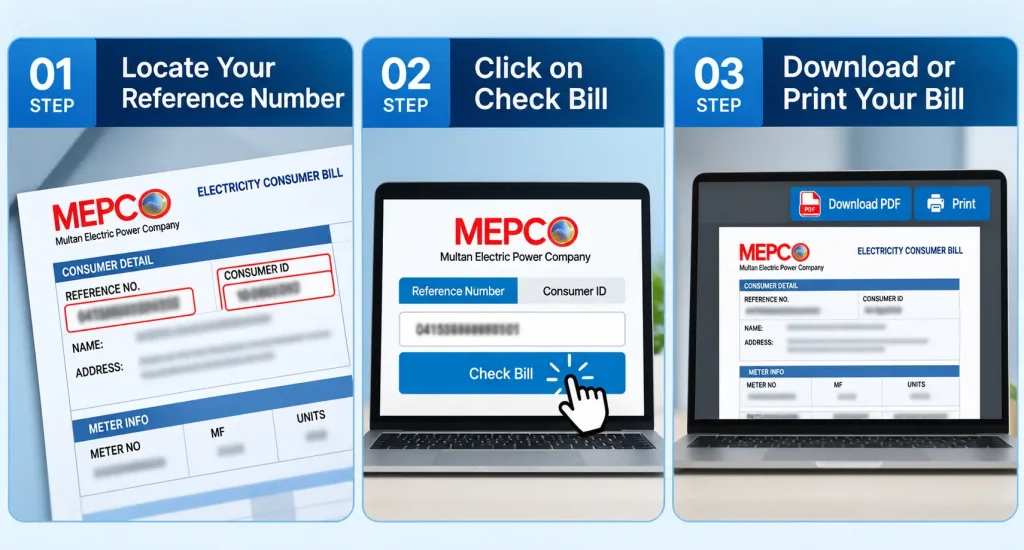
How to Check Your MEPCO Online Bill — 3 Easy Steps
To check your bill, follow these three simple steps.
Locate Your Reference Number
You will find a 14-digit Reference Number on your bill, which is essential for checking it online. If you do not have an old bill, you can also check your bill using your 10-digit Consumer ID.
Click on Check Bill
After entering the reference number or consumer ID, click the “Check Bill” button. The bill information will appear on your screen, allowing you to view the bill amount and other available details.
Download or Print Your Bill
Once the bill opens on your screen, you can download it in PDF format or print a hard copy. You may also save the downloaded PDF for future records or bank payments.
MEPCO Bill SMS Service
If you do not have an internet connection or cannot check your bill online, you can also check your MEPCO bill via SMS. Follow the simple steps below:
- Open the SMS/text messaging app on your mobile phone.
- Type “PITC” in the message box, followed by your 14-digit reference number.
- Send the message to 8334.
- You will receive the bill details via SMS.Example: PITC 12345678901234
MEPCO Helpline and Complaint Number
The main MEPCO complaint number is 118. You can also send an SMS to 8118 or call the toll-free number 0800-63726. For the online complaint method and complaint tracking, see our MEPCO complaint number guide. The regional contact numbers are listed below.
| Region Name | Contact Number |
|---|---|
| Multan | 061-9220198 |
| Bahawalnagar | 063-9239031 |
| Sahiwal | 040-9200305 |
| Muzaffargarh | 066-9200065 |
| Dera Ghazi Khan | 064-9239229 |
| Vehari | 067-3360282 |
| Bahawalpur | 062-9250102 |
| Rahim Yar Khan | 068-9230160 |
MEPCO Bill Guides
These step-by-step guides answer the most common questions about MEPCO bills:
- MEPCO duplicate bill: download and print a copy of your latest bill.
- MEPCO bill check by CNIC: find your reference number when the bill is lost.
- MEPCO old bill check: view the bill history of previous months.
- MEPCO complaint number: helpline numbers and the online complaint method.
- MEPCO bill calculator: estimate your bill from the units consumed.
- MEPCO bill payment: pay your bill online by bank app, JazzCash or Easypaisa.
- MEPCO bill October 2026: this month’s bill, due date and charges.
Why use our website?
Our website not only allows you to check your MEPCO bill online but also helps you understand important information related to it. We provide more than just a bill-checking tool; simple guides are available to address various issues and common questions. Whether you need to check a bill but cannot find the reference number, are facing billing problems, or require information about installments, you can consult the relevant guide for step-by-step instructions. We strive to ensure that every guide provides a direct and simple answer to a specific question, saving you time in finding the information you need.
Regarding the official website
MEPCO Bill Online is an independent informational website; it is not the official site. If you require official MEPCO services—such as filing a complaint, applying for a new connection, or retrieving a reference number or consumer ID—please use official MEPCO channels.
Visit the official MEPCO website for authorized information and services. For formal complaints, new electricity connections, or retrieving a reference number via CNIC, please contact official MEPCO channels. Do not enter personal information, CNIC details, or account credentials on our website for these services.
To summarize:
- Use our online service to check your bill, and read our guides to understand the bill details.
- Use official MEPCO channels to file complaints or apply for a new connection. Our MEPCO complaint number guide lists them.
- To retrieve your reference number, use the services on the official website, mepco.com.pk. Our MEPCO bill check by CNIC guide explains the options.
Frequently Asked Questions
Find answers to common questions about checking your MEPCO bill online.
01 How do I check my MEPCO bill online?
To check your MEPCO bill online, enter your 14-digit Reference Number or 10-digit Customer ID in the bill checker. Then click the “Check Bill” button.
If your bill information is available, you can view details such as the bill amount, due date, and other available billing information.
02 Is the MEPCO bill check service free?
Yes. You can check your MEPCO bill online without paying a fee for the bill-checking service.
You only need your Reference Number or Customer ID to search for your bill. Be careful with websites that ask for unnecessary payments or sensitive personal information.
03 Can I download my MEPCO bill as a PDF?
Yes, if the bill is available on the bill-checking page, you can save or download it as a PDF when the download option is available.
You can keep the PDF on your phone or computer for your records. You can also print it if you need a paper copy.
04 What if I do not have my MEPCO Reference Number?
First, check your previous MEPCO bill. Your 14-digit Reference Number is usually printed on the bill.
If you do not have an old bill, you may be able to use your 10-digit Customer ID instead. If you have neither number, contact MEPCO through its official channels to get help recovering your billing information.
See our MEPCO bill check by CNIC guide for ways to recover your reference number.
05 Does my MEPCO Reference Number change every month?
Normally, your Reference Number is linked to your electricity connection, so it does not change simply because you receive a new monthly bill.
If your connection or account information has been officially changed, the details may be different. Always check your latest MEPCO bill if you are unsure.
06 Do I need my CNIC or personal information to check my MEPCO bill?
Normally, you do not need to enter your CNIC, password, OTP, or bank details just to check your bill.
The bill-checking process generally uses your Reference Number or Customer ID. Avoid entering sensitive personal information on websites unless you know that the service is trusted and necessary.
07 Can I check my old MEPCO bills?
It depends on the bill service you are using. Some bill-checking services only provide the current bill, while previous billing records may not be available.
If you need an older bill or official billing history, contact MEPCO through its official channels. You can also check your phone, computer, or cloud storage if you previously saved old bills as PDFs.
Our MEPCO old bill check guide explains how to read the bill history on your latest bill.
08 What is the difference between a Reference Number and Customer ID?
The Reference Number and Customer ID are different numbers used to identify your electricity connection.
A MEPCO bill may show a 14-digit Reference Number and a 10-digit Customer ID. Use the number requested by the bill-checking form.
If you are not sure which one to use, check your latest MEPCO bill for both numbers.